
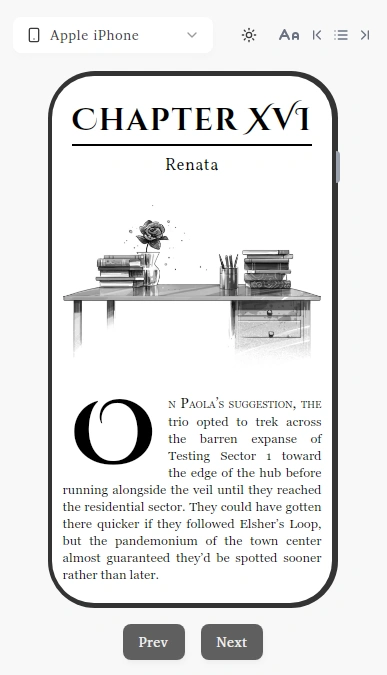
What is an Ebook? What you need to know for Digital Publishing in 2025
You've written your book. Now you need to turn it into an ebook. But what exactly is an ebook, and why does it matter for your success?
An ebook seems simple - just your book on a screen, right? Not quite. Understanding what makes ebooks work can mean the difference between selling 10 copies or 10,000.
This guide breaks down everything you need to know about ebooks, from basic formats to the technical details that affect your sales.
What Makes Ebooks Different From Regular Books?
An ebook is a digital version of a book you read on phones, tablets, e-readers, or computers. Here are the key differences:
| Print Books | Ebooks |
|---|---|
| Fixed text size | Adjustable fonts - Make text bigger or smaller |
| One book = space | 1,000 books = pocket size - Entire library on one device |
| Pay for every copy | $0 to duplicate - Sell unlimited copies |
| Lower royalties | Higher royalties - Keep more profit |
| Shipping takes days | Instant delivery - Download in seconds |
| Limited by geography | Sell worldwide - Reach readers in 190+ countries |
| Can run out of stock | Always available - Never worry about inventory |
| Returns cost money | No physical returns - Digital files can't be damaged |
Your ebook needs proper formatting to display correctly across Kindle, Apple Books, phones, and tablets. Get it wrong, and readers might leave bad reviews.
Which Ebook Format Should You Use?
Most ebooks use one of three formats. Here's what you need to know:
EPUB Is Your Best Friend
EPUB is the universal ebook format that works almost everywhere. But there are two versions:
EPUB 2.0: Start Here
- Works on 95% of devices and apps
- Perfect for novels and simple non-fiction
- Text, basic images, chapter breaks
- Best for beginners
EPUB 3.0: For the Fancy Stuff
- Everything EPUB 2.0 does, plus:
- Interactive elements and multimedia
- Better typography and layouts
- Great for cookbooks, textbooks, children's books
- Use if you need fancy features
Quick decision: Writing a novel or simple how-to book? Go with EPUB 2.0. Creating something with lots of images, videos, or interactive elements? Consider EPUB 3.0.
What About the Others?
Amazon's AZW3: Kindle's format. Based on EPUB but optimized for Amazon. Most publishing tools convert your EPUB to AZW3 automatically.
PDF: Keeps your exact layout but doesn't resize well on phones. Good for workbooks and technical manuals. Not great for novels.
Bottom line: Start with EPUB. Everything else can be converted from there.
How Poorly Formatted Ebooks Cost You Money
Here's what some authors don't know: bad formatting directly impacts your wallet.
Unoptimized Images = Higher Fees
Why This Costs You Money
Amazon, Apple, and other distributors charge you based on how much bandwidth your book uses. Big, unoptimized images = higher fees per download.
• 15MB ebook file
• $0.15 delivery fee per sale
• Costs you $15 per 100 sales
• 2MB ebook file
• $0.02 delivery fee per sale
• Costs you $2 per 100 sales
Bad Metadata = Broken Distribution
What Goes Wrong
- Wrong book title formatting: Your title displays incorrectly on devices
- Missing author information: Your name doesn't show up properly in stores
- No ISBN data: Libraries and bookstores can't catalog your book
- Missing accessibility metadata: Screen readers can't navigate your book properly
- Broken table of contents: Readers can't jump to chapters on some devices
The Simple Solution
Professional formatting tools like Lacuna handle both of these automatically:
- Image optimization: We compress and format images perfectly for every platform
- Metadata management: We set up proper titles, author information, ISBNs, and accessibility data correctly
While other authors lose money on delivery fees and struggle with broken distribution, you can focus on writing.
Every Ebook Platform Has Different Rules
Your ebook needs to work on Amazon KDP, Apple Books, Google Play, Kobo, and dozens of other distributors. Each one has different requirements.
If you've never made an ebook file, you may find yourself in a loop of trying to fix bugs in your ebook. Your ebook has to pass validation checks before these platforms will sell it.
Problems You Might Come Across
Before any distributor accepts your book, they run it through EPUB checker tools that scan for:
- Broken file structure
- Invalid formatting code
- Missing required metadata
- Images that are too large or in wrong formats
- Navigation that doesn't work properly
If your ebook fails these checks, it gets rejected. You'll have to fix the errors and try again.
The Tools Authors Use (And Hate)
A lot of authors use EPUB checkers to help them fix the bugs:
- EPUBCheck validator
- Ace accessibility checker
- Platform-specific validation tools
Running your book through these, fixing errors, re-uploading, checking again... it's a huge learning curve to solve if you've never done it before.
Skip The Technical Headaches
When you format with book formatting software like Lacuna, your ebook automatically passes all the checks. You don't have to worry about it.
Frequently Asked Questions
Why Does Professional Formatting Matter?
Poor formatting leads to platform rejections, bad reviews, and lost sales. Professional formatting tools automatically handle technical requirements so your book displays correctly everywhere.
How Do I Ensure My Ebook Looks Professional?
Use professional software like Lacuna that handles typography, images, metadata, and cross-platform compatibility automatically.
Can I Convert EPUB to PDF Easily?
Yes, but EPUB's flexible text becomes fixed in PDF, which can look bad on small screens. Professional tools handle this conversion better.
When Should I Use PDF vs EPUB?
Use EPUB for novels and most books. Use PDF only for design-heavy content like cookbooks or textbooks where exact layout matters.
Do I Need Special Software for Ebook Creation?
Word processors create basic ebooks, but professional results need specialized software like Lacuna for proper formatting, validation, and multi-platform optimization.
What File Size Should My Ebook Be?
Keep it under 10MB for most books. Larger files cost more in delivery fees and may not work on older devices.
Want Your Ebook Taken Care of For You?
As you can see, there's a lot that goes into making a professional ebook. Everything we discussed in this blog - formats, image optimization, metadata, validation checks - is handled for you automatically in Lacuna.
If you want to try it and you're on Windows, check us out.
Ready to format your book professionally?
Format your book and fall in love with it before you spend a penny