
What is a DOCX File? Complete Guide Opening, Converting & Formatting for Authors
What is a DOCX File?
As an author, understanding DOCX files is like knowing how to use a word processor - it's essential for your writing career. Whether you need to convert DOCX to PDF for submissions, open DOCX files on different devices, or prepare your manuscript for professional formatting, this complete guide covers everything you need to know in simple terms.
What Exactly is a DOCX File?
Think of a DOCX file as a special container for your writing. It's the standard document format used by Microsoft Word since 2007. But here's what makes it special: it's not just a simple text file.
A DOCX file can hold your text, formatting (like bold headings and italics), images, tables, and even complex layouts. It's like having a complete writing toolkit wrapped up in one neat package.
The "X" at the end isn't just decoration - it stands for XML, which isn't important for you to know, except that it lets different programs from different companies read and write DOCX files. The big win for writers is that it means you're not locked into using just one program.
DOCX vs DOC: Why the Change Matters
You might have heard of DOC files too. What's the difference?
The old DOC format was like a locked box - only Microsoft Word could truly understand it. This caused problems when you tried to share your work with editors using different software. Things would break, formatting would disappear, and everyone got frustrated.
DOCX changed all that. It's an open format with major advantages:
| Old DOC Format | New DOCX Format |
|---|---|
| Large file sizes - 100-page manuscripts = big email attachments | Smaller file sizes - Same manuscript takes up less space |
| Poor recovery - Corruption often meant losing work | Better recovery - If something goes wrong, you're less likely to lose work |
| Microsoft-only - Other programs struggled to open properly | Works everywhere - Google Docs, Apple Pages, and other programs handle DOCX files |
| Security risks - More vulnerable to viruses and corruption | More secure - Better protection against viruses and unwanted changes |
How to Open DOCX Files on Any Device
Good news: you probably already have software that can open DOCX files. Here are your options:
Microsoft Word
The original and still the best for DOCX files. If you're a professional writer, this is your gold standard.
Google Docs
Free, works in your web browser, and perfect for collaboration. Just upload your DOCX file and start editing.
Apple Pages
If you're on a Mac, Pages can open DOCX files. Just remember to save back to DOCX format when sharing with others.
LibreOffice Writer
A free alternative that works on Windows, Mac, and Linux. Great option if you don't want to pay for Microsoft Office.
DOCX Reader and Opener Apps
Need to quickly view a DOCX file on your phone? Apps like "DOCX Reader" can open files for viewing on mobile devices.
DOCX to PDF and PDF to DOCX Conversion
As a writer, you'll often need to convert between different file formats. Here's how to handle the most common conversions:
DOCX to PDF
Want to send your finished manuscript that no one can accidentally edit? PDF is your friend.
- In Microsoft Word: File -> Save As -> Choose PDF
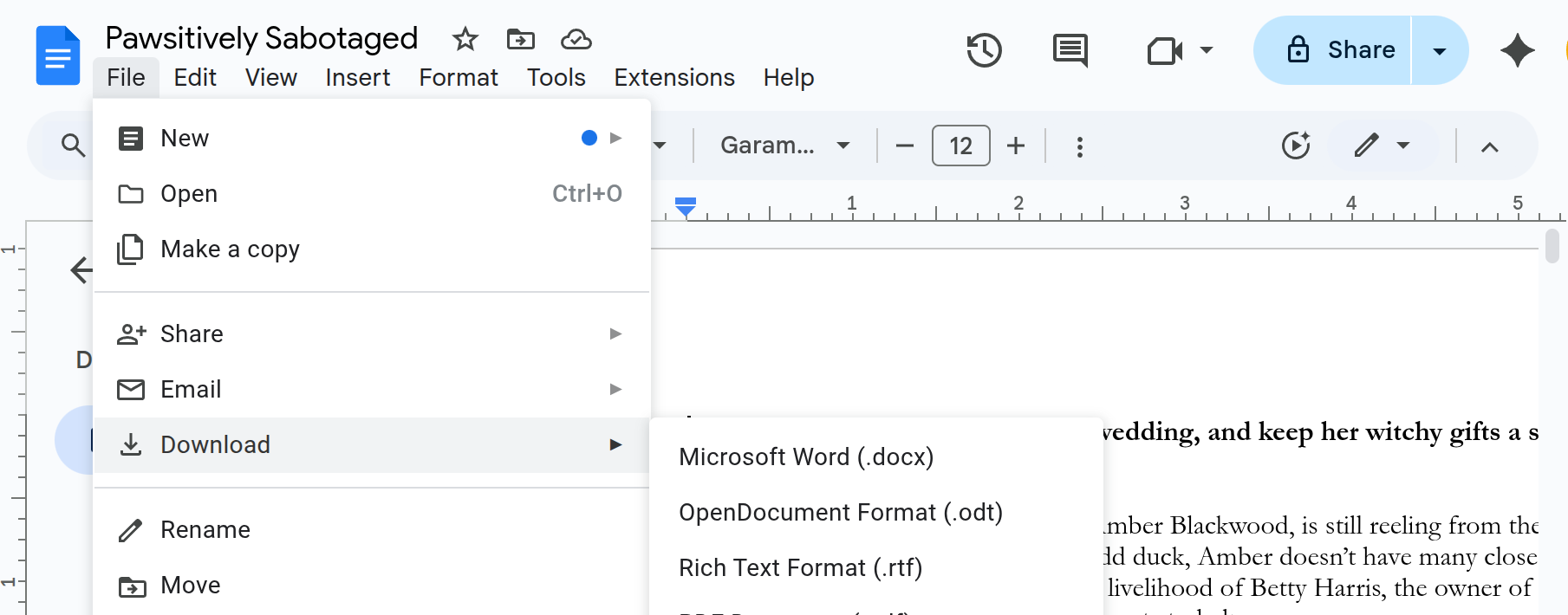
- In Google Docs: File -> Download -> PDF Document (.pdf)
- In Apple Pages: File -> Export To -> PDF
PDF to DOCX
Need to edit a PDF someone sent you? This is trickier but possible.
- Microsoft Word can convert PDFs to DOCX (File -> Open -> Select PDF)
- Online converters like SmallPDF or ILovePDF work for simple documents
Converting from Google Docs
- To download as DOCX: File -> Download -> Microsoft Word (.docx)
Converting from Apple Pages
- On Mac: File -> Export To -> Word -> Choose DOCX format
Pro tip: Always keep a backup DOCX copy when converting between formats. Some formatting details can be lost in translation, especially with complex documents.
Best Practices for Importing Your DOCX into Lacuna
Want your manuscript to import perfectly into Lacuna for professional formatting? Here's how to structure your DOCX file for the best results:
Use Proper Heading Styles
- Heading 1 for your chapter titles and main sections
- Heading 2 for subtitles and subsections within chapters
- Normal/Body text for your manuscript content
This simple structure allows Lacuna to automatically recognize your book's hierarchy and apply professional formatting.
Keep Your Formatting Clean
- Use standard fonts (Times New Roman, Calibri, Arial)
- Avoid manual formatting like extra spaces or tabs
- Let Word's built-in styles do the work
Quick win: Following these simple structure rules means your DOCX will import into Lacuna flawlessly, automatically creating a professional-looking book with proper chapters and formatting.
For a complete guide on preparing your manuscript for the best import experience, check out our DOCX Import Best Practices documentation.
Quick Fixes When Your DOCX File Won't Open
"I Can't Open This DOCX File"
- Try a different program - If Word won't open it, try Google Docs
- Check if it's corrupted - Try the "Open and Repair" option in Word
- Make sure it's actually a DOCX file - Sometimes files get renamed incorrectly
"My Formatting Looks Different"
This happens when moving between programs. Here's what to do:
- For final versions: Save as PDF to lock in the appearance
- For editing: Use simple formatting that translates well
- For manuscripts: Focus on content first, formatting second
"The File is Too Big"
Quick Size Reduction Tips
DOCX files with lots of images can get huge, making them hard to email or upload. Here's how to shrink them:
- Compress images in Word: Picture Tools → Compress Pictures → Choose "Email" quality
- Remove unnecessary images: Delete any images that aren't essential to your content
- Use web-quality images: High-resolution images are only needed for print, not digital viewing
- Check embedded fonts: Sometimes fonts get embedded and bloat file size unnecessarily
DOCX File FAQ
Can I open DOCX files without Microsoft Office?
Yes! Google Docs, Apple Pages, LibreOffice, and many other programs can open DOCX files.
Is DOCX better than DOC?
Absolutely. DOCX files are smaller, more secure, and work better across different programs.
Why do some DOCX files look different when I open them?
Different programs display fonts and layouts slightly differently. For exact appearance, use PDF for final versions.
Can I convert DOCX to other ebook formats?
Yes, but it's easier with professional formatting software, like Lacuna, that understands book structure.
How do I protect my DOCX manuscript?
You can add password protection in most word processors. Go to File -> Info -> Protect Document in Word.
What's the difference between DOCX and Google Docs format?
Google Docs uses its own format in the cloud. You need to download as DOCX to share with non-Google users.
Ready to format your book professionally?
Format your book and fall in love with it before you spend a penny